01
The short version
What is actually happening?
We're retiring Richpanel and moving fully to Zendesk. On cutover day, every ongoing ticket — Open or Snoozed — gets recreated inside Zendesk, assigned to the same person who was already handling it, with the full conversation history attached as an internal note. You pick up exactly where you left off, just inside a new helpdesk.
The migration takes 30–45 minutes, runs automatically via a script, and costs you nothing in ticket coverage — we'll be live on Zendesk immediately after.
02
Anatomy of a migrated ticket
How does a recreated ticket look?
Here's what lands in your Zendesk queue. Subject, requester, status, assignee — all preserved. The full Richpanel thread sits inside the first internal note so you keep complete context.
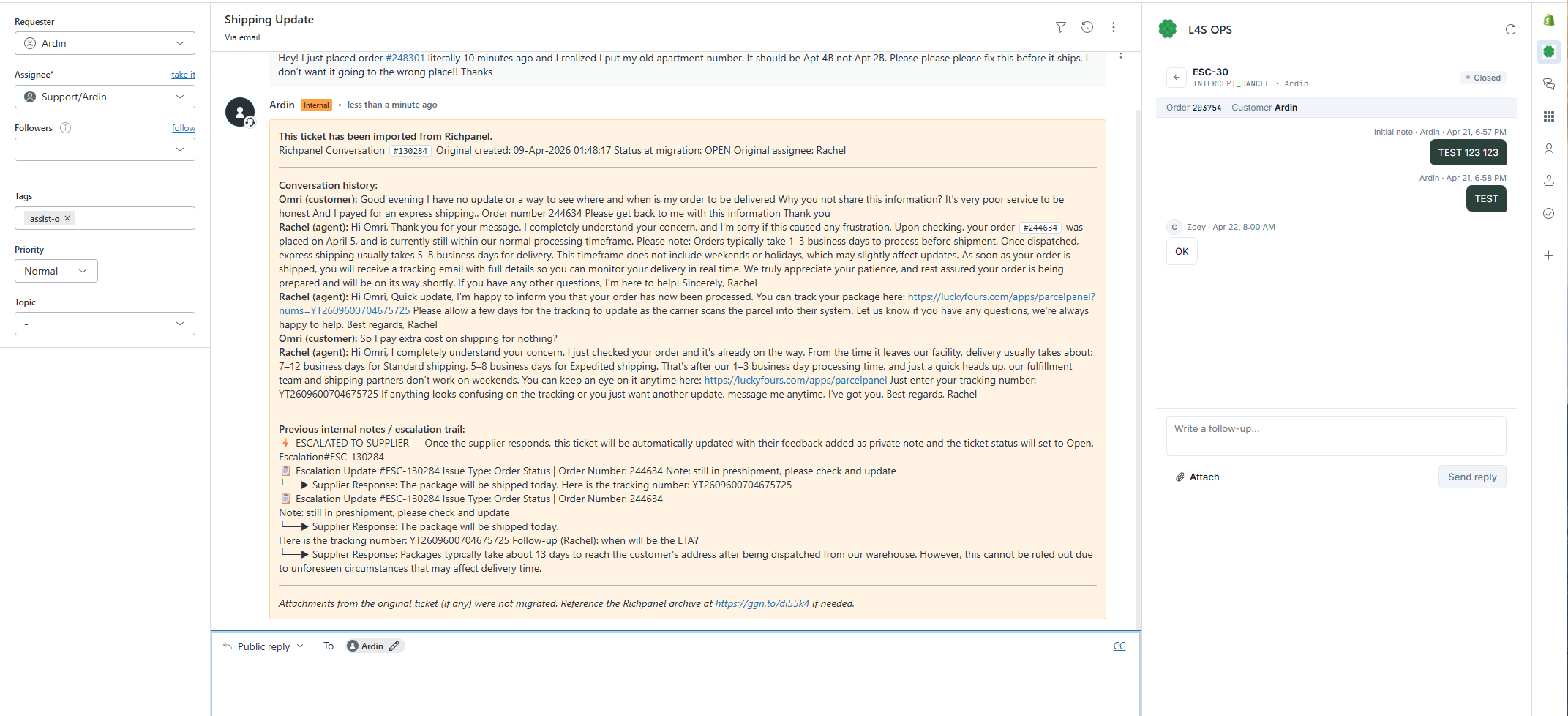
— Actual view inside Zendesk after migration —
03
Frequently asked questions
Everything else you might ask.
Q.01
When is the migration planned?
Monday, 10:00 AM EST / 22:00 PHT (Manila time). The whole operation — from cutover to live-on-Zendesk — takes approximately 30 to 45 minutes.
Q.02
What exactly gets migrated?
Every ongoing ticket — Open and Snoozed status. Closed tickets stay where they are in Richpanel (still searchable there for reference).
Q.03
What status will tickets be created in?
Exactly the status they were in before. Open tickets → Open in Zendesk. Snoozed tickets → Snoozed (pending) in Zendesk. No reshuffling — you inherit your workload as-is.
Q.04
Will customers get notified?
Yes. Upon ticket recreation, a one-time auto-response fires letting the customer know we've moved to a new helpdesk and that they can continue the conversation on the newly created thread. Normal triggers (CSAT, follow-ups, standard auto-acks) are suppressed — customers only get the one migration notice.
Q.05
Do we pick our tickets or are they assigned automatically?
Assigned automatically. Every ticket lands with the person it was assigned to in Richpanel. No ticket-picking, no reshuffling, no "who owns this now" moments.
Q.06
Do I still need to use Richpanel?
No. From cutover onward, you work in Zendesk only. You can still open Richpanel if you need to reference old information or pull an attachment from a historical ticket — but it's read-only reference, not active work.
Q.07
What about the escalations — do I need to recreate them?
No. The escalation data loads into Zendesk automatically. You'll see the full escalation trail inside the ticket and can follow up accordingly — exactly like you do today.
Q.08
When do I receive my login details?
Already sent. Check your work email — the Zendesk invite should be waiting in your inbox. If you don't see it, ping Ronalyn in Slack.
Q.09
I noticed something off — where do I report it?
Any issue, any inefficiency, anything that looks wrong on a migrated ticket — post it in #cx-insights and tag @Ardin. Don't DM, don't sit on it, don't fix it silently. The channel is the single source of truth so we can track patterns and fix them fast.